Homebridge backup incomplete? Save and test a full archive
gist Save a full backup, keep an independent copy, and test recovery separately from HomeKit connectivity.
You stopped about in. Jump back
contents
If your Homebridge backup is only a configuration file, save a full archive and check that a replacement install can use it. Keep a retrievable copy away from the original server.
I run Homebridge in Docker on my Unraid box.
The screenshots come from a throwaway test install, not my live one.
Step 1: Find the backup and restore controls
Open the Homebridge UI. Select Settings, then Backup & Restore. The backup and restore guide calls the controls Backup Now and Restore Now.
Leave Restore Now alone on the running system.
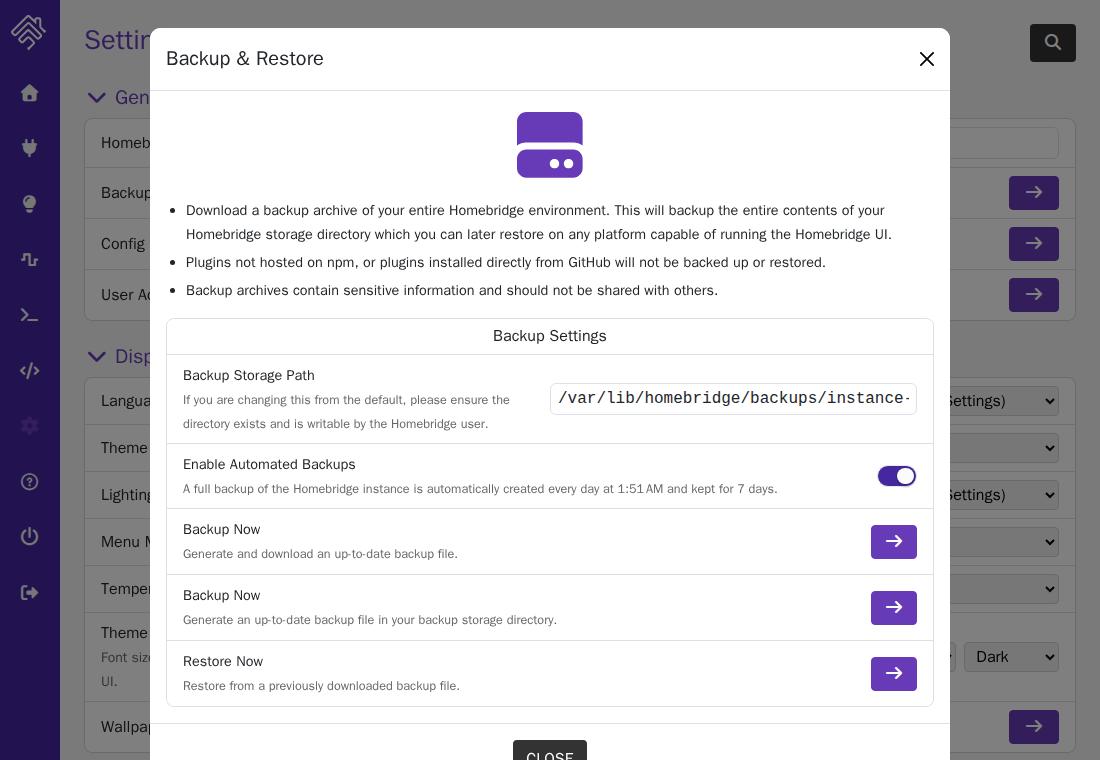
Step 2: Save a full backup
Use Backup Now to download the .tar.gz archive.
The documented archive includes configuration, cached accessories, HomeKit pairing data, plugin information, and UI accounts. A copy of config.json alone does not cover that full set. Homebridge backup contents.
The captured dialog warns that plugins installed directly from GitHub or not hosted on npm will not be backed up or restored. Record those separately.
Keep the archive private. It can contain credentials and pairing data. Record its date and the Homebridge, UI, and plugin versions separately.
For Docker, also record the image version, volume mapping, network settings, and any external files your plugins need. The official image uses /homebridge for persistent configuration and plugins. A backup archive does not recreate the Docker settings around that storage. Official Docker README.
Step 3: Keep a copy away from the server
Copy the downloaded archive to storage that remains available if the Homebridge host fails. Another folder on the same failed disk will not help.
Check that you can retrieve the independent copy. Open it with a local archive tool and confirm that it can list the contents. Do not share the listing if it reveals private details. That proves the file is readable, not that a restore works.
Step 4: Plan a separate restore test
Use a disposable destination with separate storage from the live data folder.
For an archive test, keep the destination away from your home network and devices. Restored plugins may try to contact their configured services. Allow only the access needed for the test.
Before restoring an existing bridge onto another host, stop the original instance. Homebridge explicitly requires this for migration. On the destination, open Restore Now, upload the archive, select Restore, and restart when the operation finishes. Missing plugins are installed during restoration. Official restore procedure.
Step 5: Check recovery in two parts
Check the restored installation:
- Can you sign in?
- Does the configuration match the saved copy?
- Are the expected plugins present?
- Does Homebridge start without repeated errors?
- Are required external files and plugin dependencies available?
An isolated test can answer these questions. Device connection errors may be expected when the test cannot reach your network.
Then schedule a separate HomeKit check. Keep the original instance stopped while the replacement uses its identity on the home network. Check accessory responses and the scenes or automations you depend on. Never run both copies together during this check.
For the official Docker image, HomeKit discovery requires host networking. Its README also warns that Docker Desktop on Mac and Windows has networking limitations. A working UI on either platform is insufficient proof of working HomeKit discovery. Docker networking requirements.
Record exactly what passed. “Archive opened,” “Homebridge started,” and “accessories responded” are different results.
Compare backup options
| Option | Useful for | What still needs checking |
|---|---|---|
| Homebridge UI backup | A portable archive with documented restore controls | Plugin installation, external dependencies, and device connections |
| Stopped-container data backup | Copying the complete persistent data while Homebridge is stopped | File permissions, Docker settings, and compatibility with the replacement image |
| Independent host copy | Keeping either backup available after host failure | Whether the saved copy is readable and can actually restore |
These options can work together. A UI archive plus a separate storage copy gives you two recovery paths. Neither replaces a restore test.
For a manual backup, Homebridge documents copying the whole storage directory and reinstalling plugins yourself. Stop the container before making a filesystem copy so files are not changing during the copy. Manual backup guidance.
Common questions
What’s the best way to move to a new Raspberry Pi with minimal impact to Apple Home?
Use a full UI backup and stop the original before restoring on the replacement. Keep the original storage until the replacement passes your checks.
The archives are documented as cross-platform compatible. That does not prove every plugin or hardware dependency will work on the destination. Homebridge migration guidance.
So I won’t need to set up anything in Apple Home?
Do not assume that. The archive includes pairing data, but Homebridge notes that some restores may require a reset and adding the bridge again. Check the existing connection before taking that step. Connection issues after restoring.
How do I update the OS without losing the preinstalled setup?
Keep the original disk or card intact. Save a full Homebridge backup and record anything supplied outside Homebridge, such as extra services or system packages.
Check the hardware support and installation instructions before replacing the OS. A Homebridge archive is not a disk image, so it cannot promise to reproduce the entire preinstalled system.
Is saving the configuration file enough?
No. It helps recover settings, but a full recovery also needs the other stored data and working plugins. Keep a full archive and test the recovery path.
Related: self-hosting guides · all guides.
../self-hosting/ every Self-hosting guide